Sprinklr · Agent Assist
Quietly Powerful: An Invisible Ally
Complex cases used to overwhelm support agents mid-conversation. I designed the AI that handles the busywork without making the decisions.
Ownership
What I personally drove
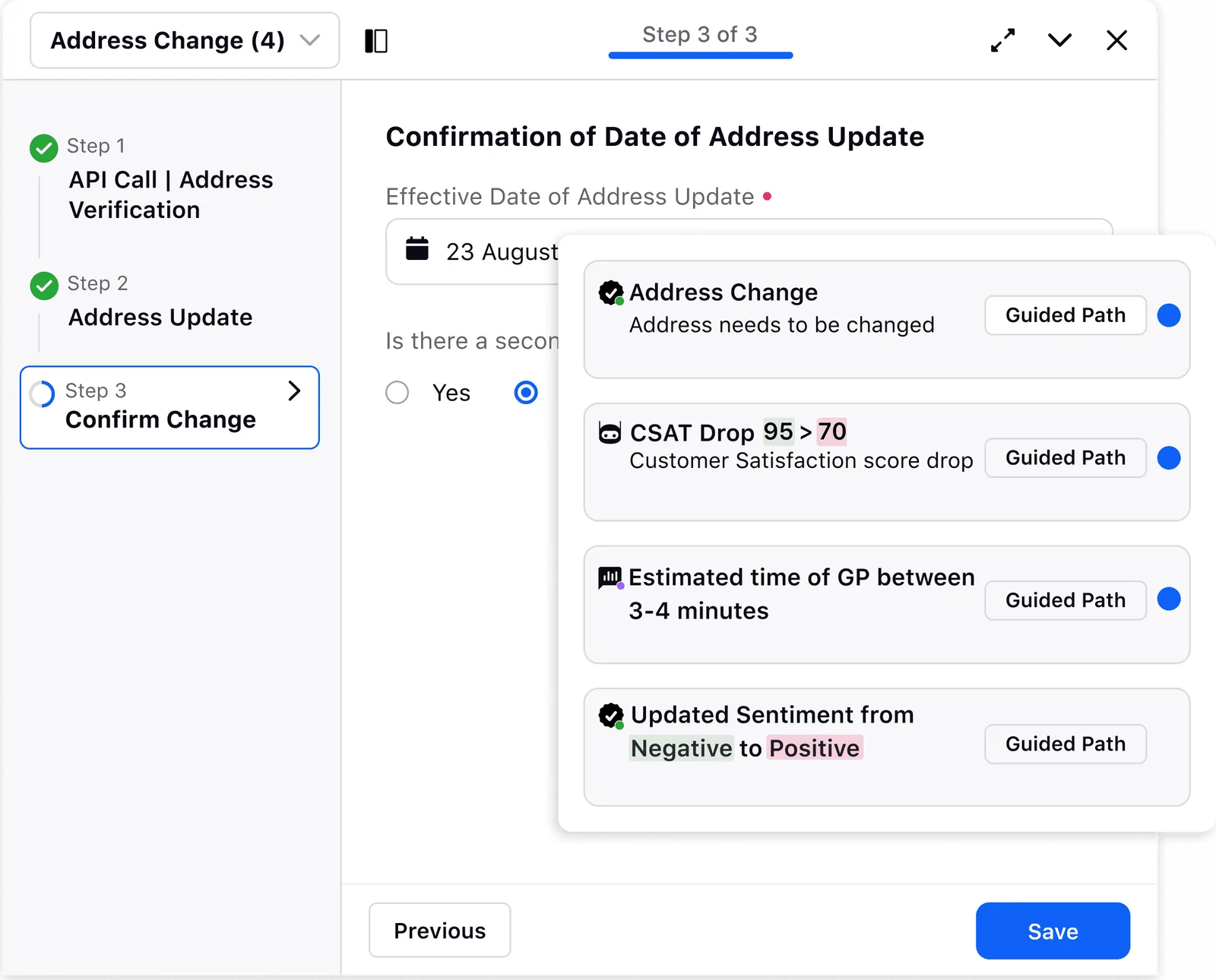
- The guided stepper.A one-step-at-a-time pattern where the agent’s choice drives what surfaces next. That was the decision that kept agents inside the conversation instead of losing their place. (How I got there, and the layout I rejected, is in Explorations below.)
- The assistive-not-autonomous line. Against a push for more AI and something flashier, I argued that AI suggests and the agent always confirms, because in live support, the moment the system decides for the agent, it costs the trust the whole product runs on. I held that line; it became the core principle.
- The compliance voice. I rewrote the flagging copy so it reads like a teammate looking out for you, not a system policing you. The full before/after is below.
The context
What you're looking at
Sprinklr
Sprinklr is an enterprise customer-experience platform. Large brands use it to run customer service, social, and marketing across every channel from one place. This work lives in Sprinklr Service, the contact-center product where support agents handle live customer conversations all day.
Agent Assist, where I worked
Agent Assist is Sprinklr’s AI layer for live customer service: smart responses, compliance checks, sentiment nudges. It handles the repetitive backend work of pulling data, updating tickets, and surfacing the next-best action in real time, right inside the live conversation, so the agent’s attention stays on the customer. Within it, I owned Guided Workflows, and extended the pattern into the admin builder teams use to create those flows without engineering.
Impact
What it moved
- ↓ 40% manual errors. One guided flow with the next-best action inline, replacing fragmented manual steps. From post-launch performance reports.
- ↑ 32% CSAT. Agents staying present in the conversation instead of fighting their tools. From post-launch performance reports (customer success team).
- ↑ up to 50% agent efficiency.The guided stepper removed the tab-switching and lost-place problem that ate agents’ time. This work ships into Sprinklr’s AI Service platform, which Sprinklr benchmarks at up to a 50% agent-efficiency lift.
What’s mine:I designed the patterns; Product and Data tracked these across rollout. The error drop and CSAT came from post-launch performance reports; the efficiency figure is aligned to Sprinklr’s published benchmark for the platform this shipped into. The design was mine; the measurement was a team effort.
The challenge
Live support kept breaking mid-conversation
An agent on a complex case couldn’t see their own progress, juggled several active workflows at once, and leaned on instructions that weren’t clear, so the hard cases came with cognitive load, delays, and errors. And admins couldn’t change a workflow without engineering, so the system fell behind the business it was meant to serve.
I'd lose my place mid-chat while switching tabs. It broke my rhythm with the customer.
Even small workflow changes needed engineering. It slowed us down every time.
From research interviews with support agents and admins.
The question
How might we streamline complex workflows so support teams focus on customers, not tools?
Insight
Where AI should step in, and where it shouldn't
Not every problem needed a feature; some just needed the system to handle it quietly. AI belonged exactly where repetition and hesitation lived: auto-filling data, updating tickets, surfacing the next-best action. But the moment it started deciding for the agent, it would cost the one thing live support runs on: trust. That boundary was the thing I was really designing, and it turned into a series of concrete calls I had to make.
Key design decisions
The calls that shaped it
Assist-never-decide was the principle; here’s where it became design.
The call I fought for.The push was for more AI, something flashier than the competition. I argued the other way: the timeline ruled it out, and more AI meant less room for the agent to step in. A familiar, predictable shape can feel like settling next to something flashier. It isn’t. Under live pressure, predictable-and-in-control is exactly what an agent wants, and that’s the bar I held the design to.
One line, rewritten
The compliance voice
One call I made lived entirely in the words. The compliance layer flags a message when it might land the wrong way with a customer, and how that flag speaks decides whether an agent trusts it or resents it.
“Warning: message flagged for tone.”
Reads like being policed.“This might land as a little abrupt. Soften it before you send?”
Reads like a teammate looking out for you.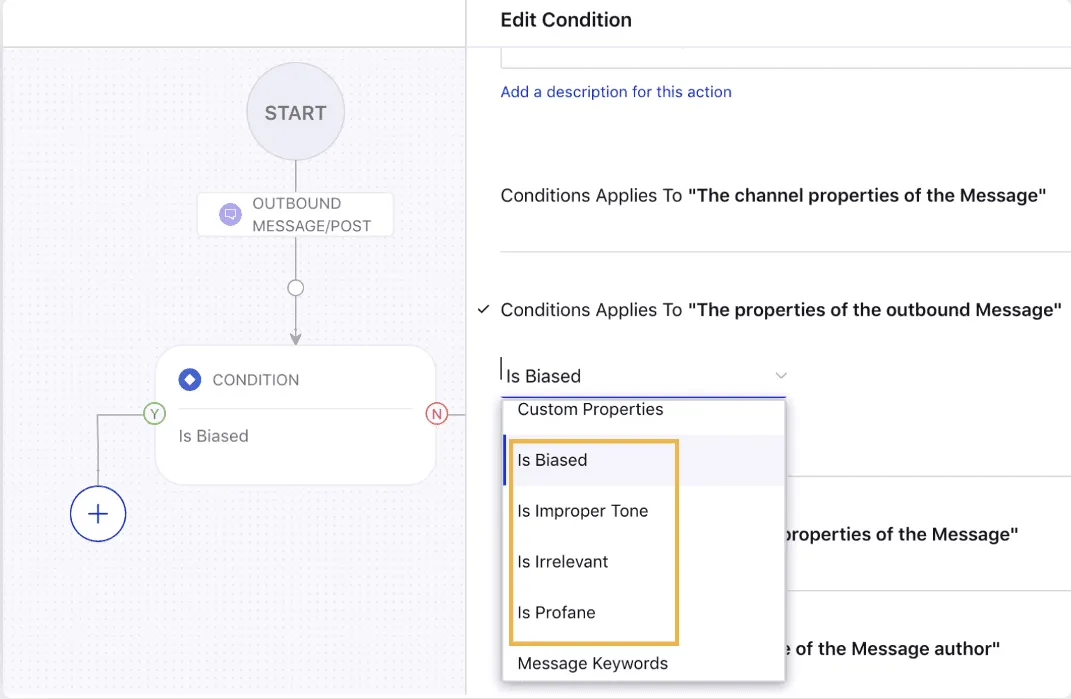
The words are the product. Clear microcopy did more work than heavier UI ever could.
The solution
One system, two audiences
Those calls added up to one system, two audiences: an admin builds the flow, and the AI assists the agent in real time.
Agent-facing
AI-powered Guided Workflows
Real-time guidance rendered as structured, step-by-step flows the agent completes inside the conversation, with no tab-switching and no lost place.
Admin-facing
No-code Workflow Builder
Admins design, style, and deploy AI-assisted flows themselves, removing the engineering dependency and letting the system iterate at the speed of the business.
Agent-facing · the Care Console
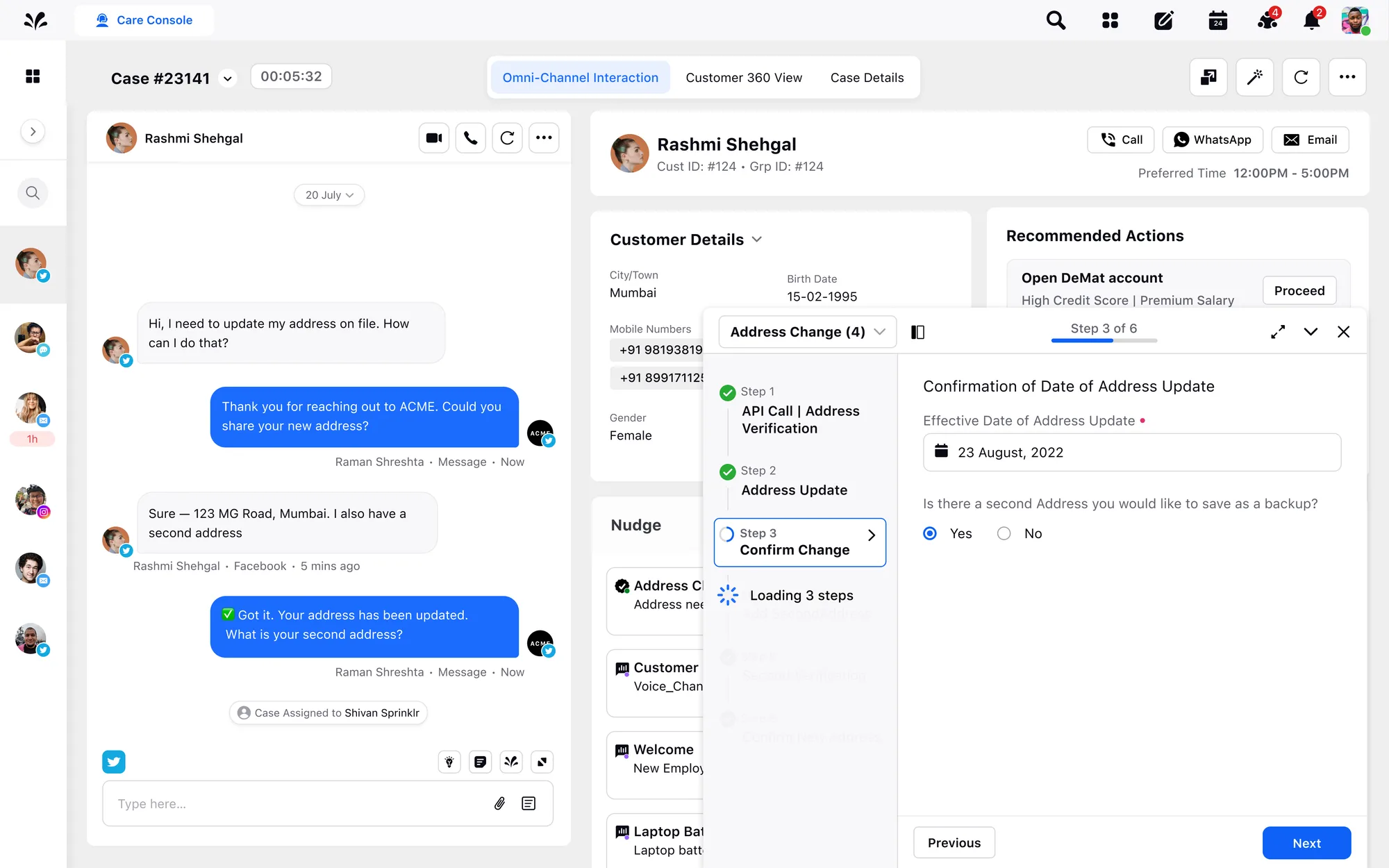
- 1Guidance lives inside the conversation, so the agent never leaves the chat.
- 2Recommended Actions are suggested; the agent confirms. AI assists, never executes.
- 3A progress stepper for wayfinding: what's done, the step they're on, and what's left, all at a glance, so the agent never loses their place in a multi-step task.
Admin-facing · the Guided Path Builder
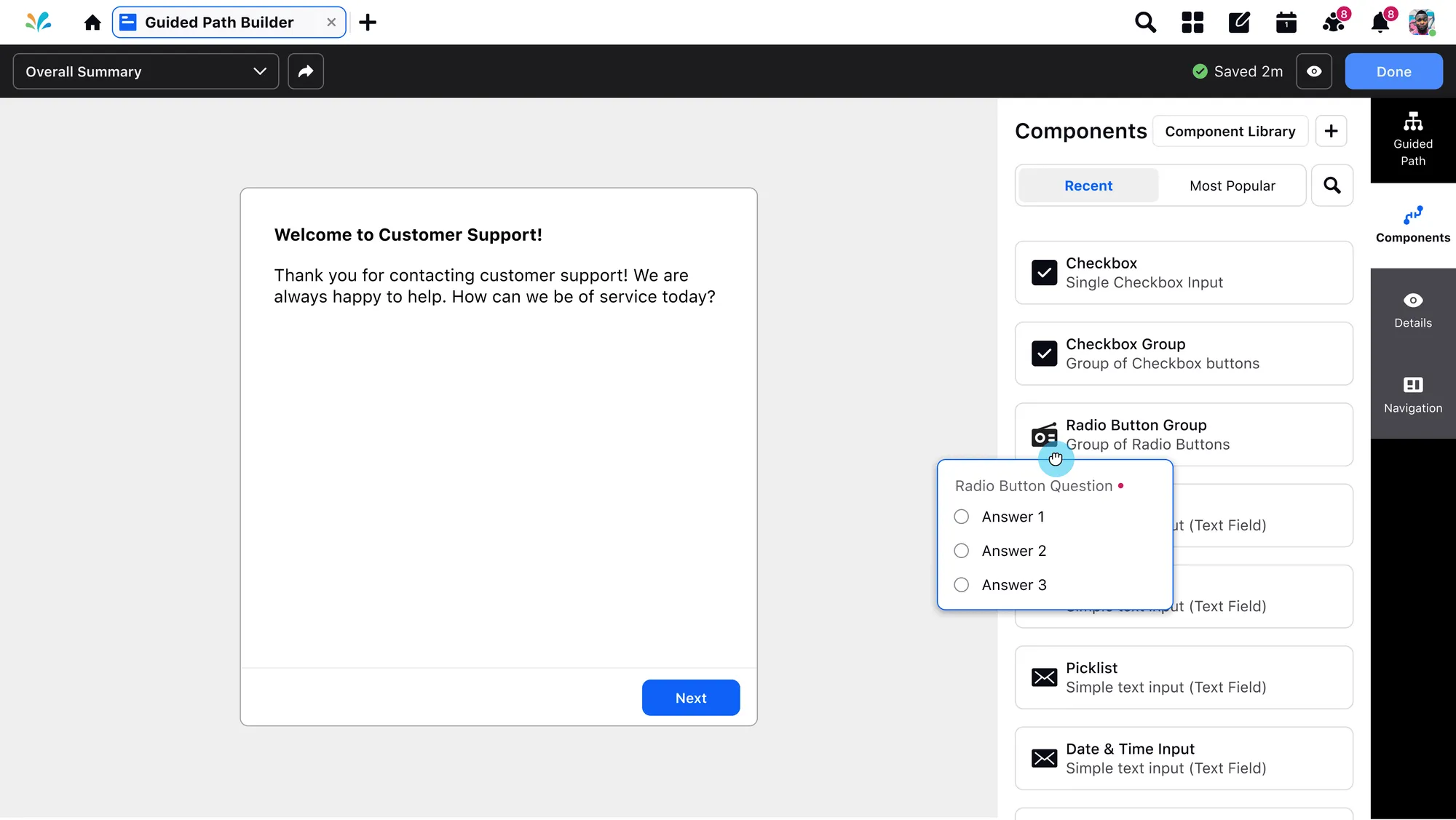
- 1A drag-and-drop component library: checkboxes, radios, inputs, ready to place.
- 2Publish with no engineering. Admins ship changes themselves.
- 3Live preview shows exactly what the agent will see.
- 4Drag any component straight onto the canvas.
Explorations
A few directions before it clicked
I worked straight in high-fidelity, pressure-testing real alternatives against daily ticket-review feedback before the pattern landed. The biggest fork came first:
Why I moved off the horizontal layout
Reconstruction of the early exploration · rebuilt low-fi from the shipped patternIt doesn’t scale.
- Past three or four steps, the rest clip off-screen, so the agent can’t see the whole flow.
- Finding your place means scanning sideways, mid-conversation, which breaks the agent’s rhythm.
- The step row crowds out the live chat, covering the conversation the agent is having with the customer.
Scales, and stays calm.
- One step at a time: the agent’s choice drives what surfaces next, so focus stays on the task.
- Progress reads top-to-bottom and holds any number of steps without crowding.
- The flow sits beside the conversation, never on top of it, so the customer stays in view.
From design to shipped
Keeping the pattern intact through the build
- Into the system, not just a screen.I contributed the guided-workflow pattern into Sprinklr’s Hyperspace design system, so it scaled across the product instead of living as a one-off.
- True to the design, through the build.I QA’d the shipped flow against my designs and worked with the engineer until the step transitions and states behaved the way they were meant to.
Reflection
Calm, on purpose
This project was about making a dense product feel lighter for the people who live in it all day. A few things stuck:
- With AI, the design problem was really a trust problem.The interface’s real job was to make an invisible, probabilistic system feel predictable and accountable, so agents would actually lean on it instead of second-guessing it.
- Words outperformed features. The change that mattered most all project was a sentence, not a screen.
- Accessibility reshaped it. Small contrast and sizing changes made workflows calmer and faster.
- I designed one pattern for two audiences, instead of two separate screens, which is what let it scale.
Next: deeper usability testing, a UX-writing style guide, and bringing richer accessibility, including screen-reader support, into the product.